

For project managers and team leaders, every hour spent by a team member represents more than just work — it’s an investment in time, resources, and ultimately, project profitability. Yet understanding the distinction and comparing billable vs. non-billable hours is often overlooked.
Without this clarity, time tracking can lead to inaccurate invoicing, hidden inefficiencies, or strained team capacity. By understanding how to calculate, manage, and reduce these hours, you’ll gain better control over your project costs and ensure sustainable team performance.
In this article, we’ll explore the key differences between billable and non-billable hours and discover how each impacts cost tracking, resource planning, and project profitability.
What are billable hours?
Billable hours are the hours that can be directly charged to a client, customer, or external stakeholder based on an agreed contract, billing rate, or scope of work. From a cost-tracking perspective, billable hours are the clearest link between time spent and revenue earned.
Depending on your industry, billable hours may include:
- Development, design, or testing work for a client project
- Executing test cases or validating features under a paid engagement
- Client meetings directly related to delivery or decision-making
- Paid consulting, advisory, or support sessions
- Client-specific research, documentation, or configuration
- Bug fixes or enhancements covered by a maintenance contract
From a team leader’s perspective, billable hours are not just about charging clients — they are a core input for project profitability, forecasting, and pricing decisions.
And…non-billable hours?
Well, they are the opposite of what we just mentioned above. Non-billable hours are hours spent on work that cannot be charged directly to a client. While they do not generate immediate revenue, they are essential for keeping the organization running and improving long-term performance.
A common mistake in comparing billable hours vs. non-billable hours is to treat non-billable ones as “lost time.” In reality, non-billable work often enables billable work to happen effectively.
Typical non-billable activities include:
- Internal meetings, stand-ups, and retrospectives
- Training, onboarding, and skill development
- Administrative work such as reporting, timesheets, and coordination
- Internal planning, backlog refinement, and documentation
- Sales activities, demos, and proposal preparation
- Process improvement and internal tooling work
From a management standpoint, these hours still consume capacity and budget, even if they don’t appear on an invoice.
Billable vs. non-billable hours: What’s the difference?
|
|
Billable Hours |
Non-billable Hours |
|---|---|---|
|
Definition |
Time that can be charged directly to a client or customer |
Time spent on internal or supportive work that cannot be charged |
|
Focus |
Generate revenue |
Enable operations, quality, and long-term growth |
|
Typical work type |
Client project execution, test execution, development, paid consulting, and client meetings |
Internal meetings, training, administration, planning, documentation, sales prep |
|
Billing rate |
Charged at an agreed hourly rate or fixed contract value |
Not chargeable; treated as overhead cost |
|
Priority |
High – requires accurate, timely tracking |
Medium – requires visibility and categorization |
|
Key metrics |
Billable hours, billable utilization rate, revenue per hour |
Overhead ratio, capacity usage, efficiency trends |
|
Risk |
Underbilling, revenue leakage, and margin erosion |
Hidden inefficiencies, inflated costs, and team burnout |
|
Management goal |
Ensure fair billing and sustainable profitability |
Control overhead while enabling effective delivery |
Calculating billable hours is relatively simple. All you have to do is multiply the total hours worked on a client project by your hourly rate. The formula should be like this:
Total Billable Amount = Total Billable Hours × Hourly Rate
For example, if you have a team member who logged 100 hours at a rate of $50 per hour:
Total Billable Amount = 100 x 50 = 5,000
However, things become a bit more complicated when you have to charge different fees to different clients and projects, or when you have a diverse team doing tasks at different billing rates. And don’t forget about all those variations that you need to account for.
This is where Teamboard TimePlanner simplifies everything. You just have to track working time and mark billable hours correctly, and leave the rest to TimePlanner.
1. Set hourly billing rates
When calculating billable hours, the first step is to set hourly billing rates for different team members or services provided. However, managing these rates, especially when employees have varying rates based on role or expertise, can lead to errors or confusion.
For instance, a senior developer might charge $100 per hour, while a junior designer might charge $50. You should accurately assign these rates in your system to ensure each team member’s work is billed appropriately.
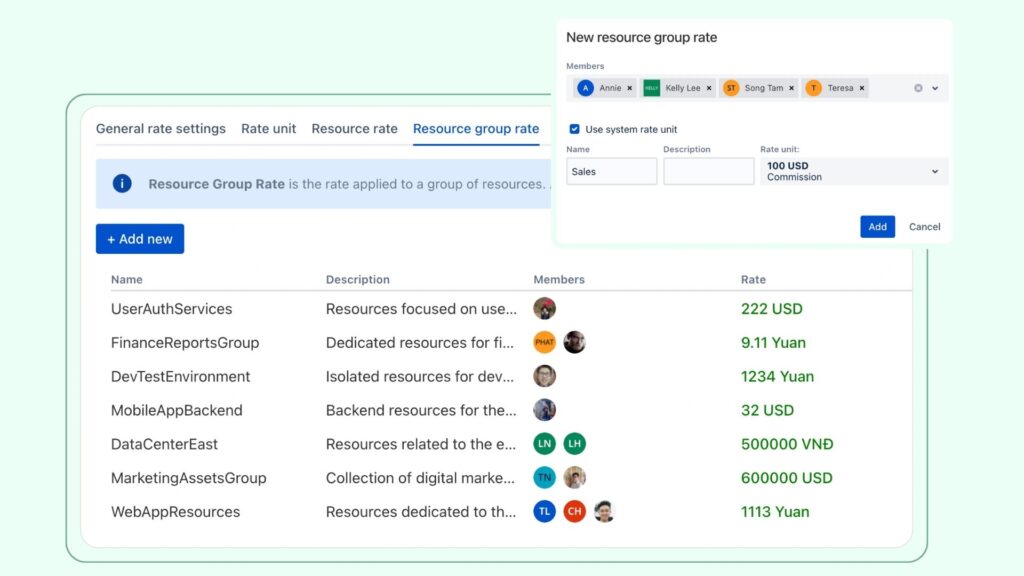
With TimePlanner, you can easily set and assign different hourly rates for each team member, role, or project. This allows you to avoid errors in rate assignment and ensures that each billable hour is calculated using the correct rate, automatically updating based on the selected project or team member.
2. Track time spent on activities
After setting up billing rates, you should focus on tracking the time spent on activities. When calculating billable hours, ensuring to record each task correctly helps maintain accurate financial records and supports efficient billing processes later on.
Additionally, one of the most common issues is the possibility of missing or incorrect time entries. Without a dedicated time-tracking tool, employees may forget to log time spent on client-related activities or accidentally record non-billable work as billable.
Fortunately, you can simplify this process by using a time tracking tool like TimePlanner. Employees can start and stop a timer as they work on client-related tasks, ensuring that all time is recorded accurately and in real-time.
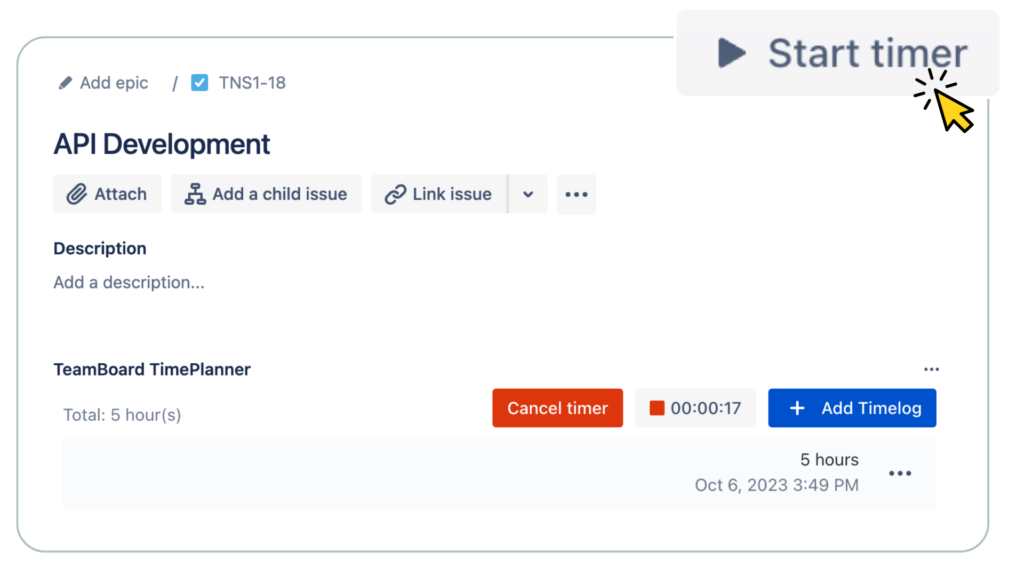
As a result, this eliminates the risk of missing entries and allows for seamless tracking of billable hours without relying on manual logs.
3. Separate billable hours from non-billable ones
On a daily basis, some work becomes billable, while others don’t. So, it is important to separate time spent on client work (billable) from time spent on internal tasks or administrative work (non-billable). If not categorized correctly, this can lead to clients being overcharged or undercharged.
But don’t worry, you can just clarify with your team which work should be counted as billable or non-billable in the first place. Or, in TimePlanner, it is just a matter of clicking a button to turn any time spent on work into billable hours.
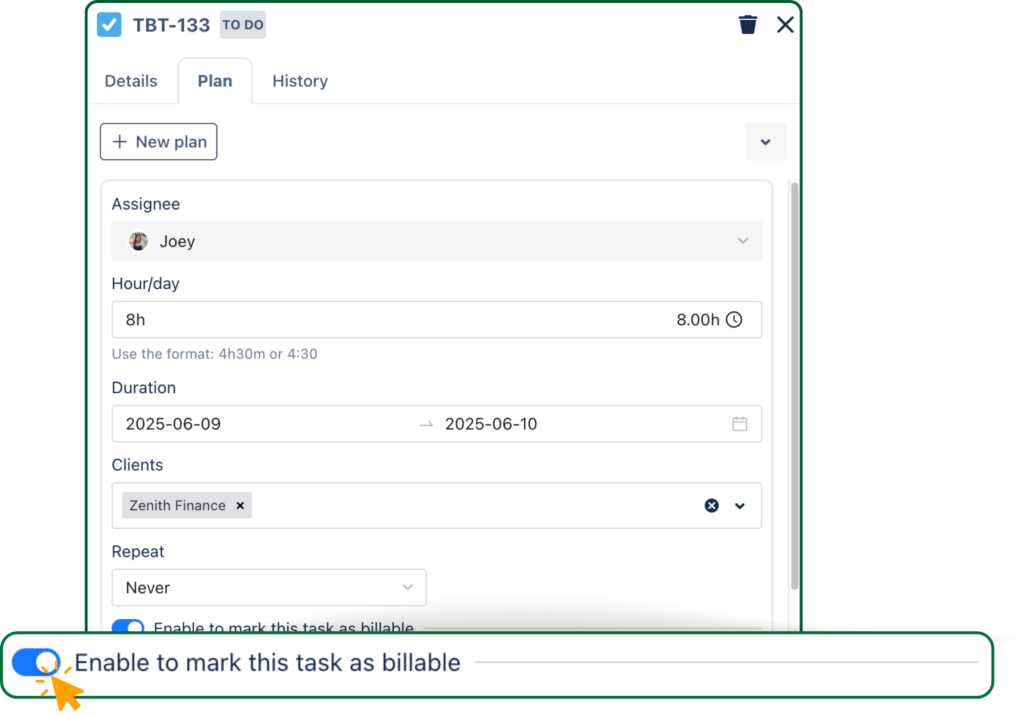
And if you ask me, internal meetings, training, or research time can be marked as non-billable, while all client-related tasks are categorized as billable. This separation reduces errors and ensures that clients only get billed for relevant work.
4. Track and calculate billable hours
After tracking time, the next step is to calculate the total revenue generated from billable hours. If you’re managing multiple clients or projects with different hourly rates, it can be challenging to ensure accurate calculations without a proper tool.
Therefore, understanding how to track billable hours (especially in Jira) is extremely important. Besides, adding and calculating hours from various team members can lead to human error, especially when dealing with complex billing structures.
With TimePlanner, you can track and calculate the total billable hours for each project and team member. The tool aggregates the hours worked and applies the correct hourly rate to generate accurate billing amounts.
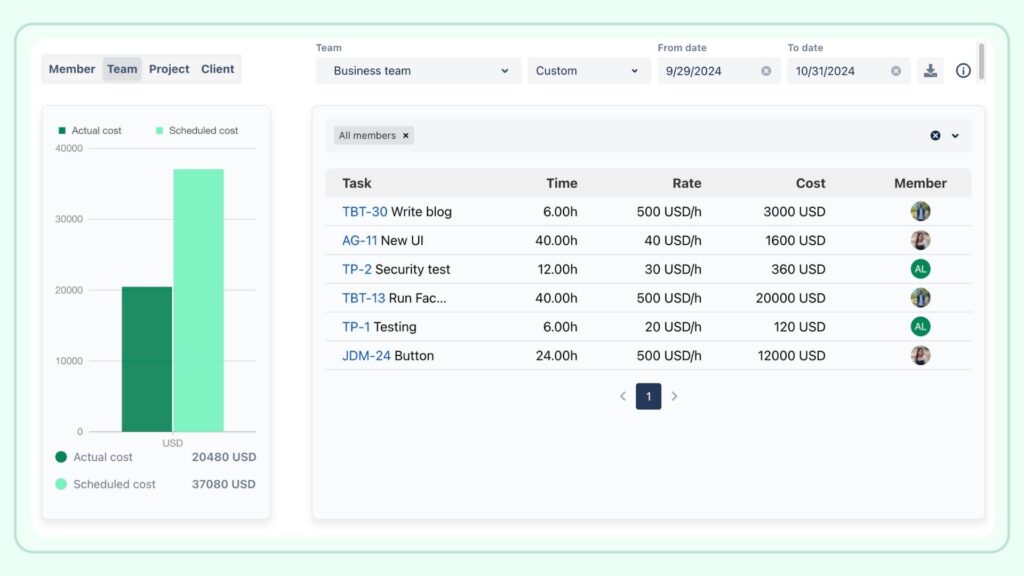
Reports for Billable vs. Non-billable hours
Additionally, you can generate detailed reports that give you an overview of total billable hours across all team members and projects, and compare scheduled vs actual cost. TimePlanner automates this process, ensuring all hours are accounted for and calculated correctly, without the need for manual work.
How to reduce non-billable hours
1. Identify where non-billable time goes
Reducing non-billable hours begins with visibility. Therefore, project managers should regularly review time tracking and reporting data to understand where non-billable time is being spent and why.
Patterns often emerge around recurring meetings, manual administrative work, or unclear responsibilities. Therefore, this analysis helps distinguish between necessary non-billable activities and those that provide little value.
Without this level of insight, attempts to reduce non-billable time are often based on assumptions rather than facts.
2. Improve processes and workflows
After identifying low-value non-billable activities, process improvements can significantly reduce wasted time. This may include streamlining meetings, clarifying agendas, standardizing documentation, or improving handoffs between teams.
Automating repetitive administrative tasks, such as reporting or status updates, can also free up meaningful capacity. From a cost-tracking perspective, even small workflow improvements can lead to measurable reductions in overhead when applied consistently across a team or organization.
3. Set clear guidelines
Clear guidelines help teams make better decisions about how they track and allocate their time. Project managers should define what qualifies as billable and non-billable work and share these definitions across all projects.
Besides, ambiguity often leads to inconsistent tracking and unreliable data. Clear rules also prevent billable and non-billable work from being mixed in a single time entry, which improves reporting accuracy and makes cost analysis more meaningful.
4. Use the right tools
The right tools can dramatically reduce the effort required to track time while improving data quality. Centralized time tracking systems with clear categorization, real-time reporting, and integration with project and cost management tools help teams spend less time logging work and more time delivering value.
For project managers, these tools provide the visibility needed to make informed decisions about capacity, costs, and priorities without adding unnecessary administrative burden to the team.
Conclusion on billable vs. non-billable hours
The distinction between billable and non-billable hours is crucial for making informed decisions about project costs, resource allocation, and team efficiency. Billable hours directly affect revenue, while non-billable hours highlight the necessary but often overlooked work that supports project success.
By tracking both types effectively, project managers can ensure transparent cost management, optimize team workflows, and maintain a healthy balance between client delivery and internal operations. Ultimately, understanding and managing both billable and non-billable time enables smarter decisions, healthier teams, and more profitable projects.
The post Billable vs. Non-Billable Hours: What you need to know appeared first on TeamBoard – Resource planning, project management and Gantt Chart for Jira, monday.com.
Leave a Reply