

For project managers and team leaders, tracking billable hours is not just about logging time. It’s about understanding where effort is spent, how costs accumulate, and whether projects are actually profitable.
When teams work in Jira every day, it makes sense to track billable hours there as well. Sadly, Jira doesn’t solve this problem automatically (or entirely, I would say).
In this article, we’ll walk through how to track billable hours in Jira in a structured and realistic way. We’ll also focus on building the right habits, selecting the optimal setup, and utilizing data to support more effective planning, forecasting, and cost control.
Why tracking billable hours matters
Billable hour tracking is often perceived as an administrative requirement, but for project leaders, it is a strategic capability. When done well, it creates visibility and control across delivery, finance, and capacity planning.
1. Financial visibility and cost control
At its core, billable hour tracking answers a fundamental question: How much does this work actually cost us?
Without accurate time data, project costs are often estimated using assumptions rather than facts. This makes it difficult to:
- Understand whether projects are profitable
- Detect cost overruns early
- Adjust scope, staffing, or timelines proactively
By consistently tracking billable hours, project managers gain a real-time view of how effort translates into cost. This visibility is critical for managing budgets, especially in long-running or complex engagements.
2. Project profitability and margin protection
Many projects appear successful from a delivery standpoint while quietly eroding margins. Unplanned work, excessive rework, or poorly estimated tasks often go unnoticed until it is too late.
So, billable hour tracking helps leaders compare estimated effort with actual billable time and identify where non-billable work is consuming capacity. Additionally, they can identify which projects or clients consistently become less profitable.
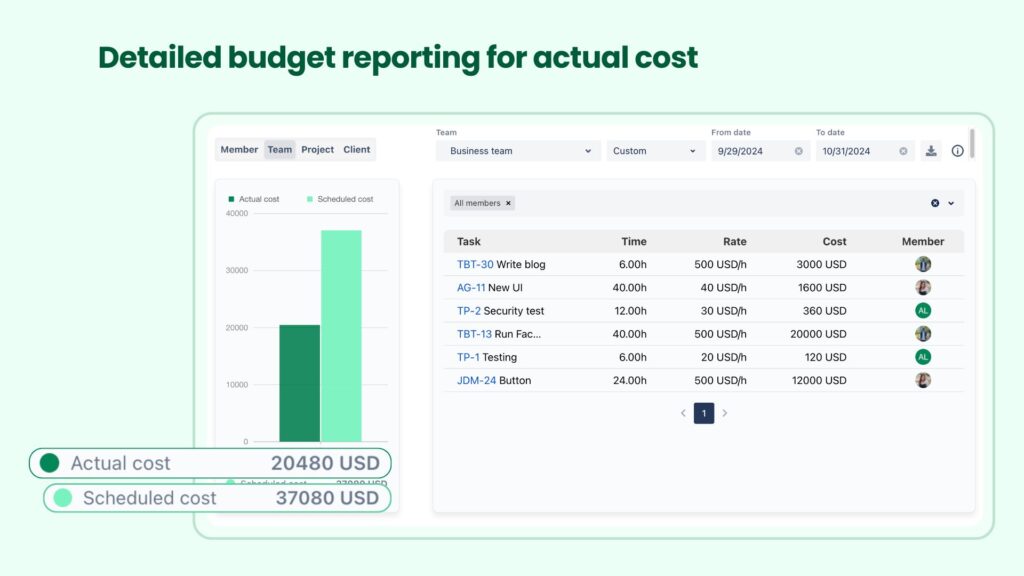
Over time, this data becomes important for refining estimates, improving pricing models, and protecting margins.
3. Better forecasting and planning
Historical billable hour data is one of the most valuable inputs for future planning. It allows project managers to:
- Forecast delivery timelines more accurately
- Estimate future projects based on real effort, not guesswork
- Plan staffing levels with confidence
Without this data, planning relies heavily on intuition. With it, leaders can make evidence-based decisions that reduce risk and improve predictability.
4. Clearer accountability and client transparency
Accurate billable tracking also supports trust—both internally and externally.
Internally, it clarifies expectations:
- What work is billable
- How time should be logged
- How effort contributes to business outcomes
Externally, it enables:
- Clear, defensible invoices
- Transparent reporting for clients
- Fewer disputes about time and scope
For service-oriented teams, this transparency strengthens long-term client relationships.
5. Sustainable team utilization
From a leadership perspective, billable hour data is not just about revenue—it is also about people.
Tracking billable vs. non-billable time helps managers:
- Identify overworked or underutilized team members
- Balance workloads more fairly
- Detect burnout risks early
Used responsibly, billable hour data supports healthier, more sustainable teams.
How to track billable hours in Jira specifically
Tracking billable hours in Jira is less about one feature and more about a system: definitions, expectations, structure, and reporting. Below is a step-by-step approach that works well for most teams.
1. Define billable vs. non-billable activities
Before touching Jira settings or tools, the most important step is alignment.
As a project manager, you need to clearly define what counts as billable time for your organization, such as:
- Client development or implementation work
- Testing and quality assurance are tied to client delivery
- Consulting, configuration, or advisory work
- Client-requested meetings or workshops
Meanwhile, non-billable work typically includes:
- Internal meetings and administration
- Training and onboarding
- Pre-sales or internal research
- Rework caused by internal process issues
Additionally, teams must decide where the billing decision is made. Some organizations mark entire issues as billable, while others allow individual worklog entries to be billable or non-billable.
Keep in mind, issue-level billing is simpler but less flexible, while worklog-level billing provides accuracy at the cost of added discipline.
For more details about the difference between the two, please read What you need to know about Billable vs. Non-billable hours.
2. Establish clear expectations and billing policies
Once billable work is defined, expectations must be made explicit next, and this is where leadership alignment matters most. For that, billing policies should clearly outline when time must be logged, the level of detail required for worklog descriptions, and the process for handling exceptions.
For example, teams should know whether logging time at the end of the week is acceptable or whether daily logging is required to ensure accuracy.
Besides, clear expectations also reduce tension between delivery teams and finance. When billing rules are documented and shared – ideally in a central place such as Confluence – there is less room for misunderstanding and fewer last-minute corrections during invoicing.
From our perspective, consistency is more valuable than strictness. Therefore, policies should encourage reliable behavior rather than punishing mistakes.
3. Choose your tracking method and set up Jira
3.1 Using Jira’s built-in time tracking
Jira’s native time tracking allows users to log time directly on issues. For many teams, this is the natural starting point. It captures who worked on what and for how long, which already provides basic visibility into effort.
To adapt this for billable tracking, teams often rely on conventions such as labels, components, or custom fields to indicate billable work. Some teams also structure projects so that all issues within a project are assumed to be billable.
This approach works best when billing needs are simple and reporting requirements are limited. However, as complexity grows, its limitations become more visible.
3.2 Adding structure with custom fields and workflows
As teams scale, manual conventions are hardly enough. Therefore, adding structure through custom fields and workflow rules helps enforce consistency.
For example, requiring a “Billable” field before an issue can be moved to Done ensures that billing decisions are made deliberately. Workflow validations can also prevent issues from progressing if time has not been logged, reducing gaps in data.
While this adds governance, it also introduces overhead. Project managers should balance control with usability to avoid creating friction that discourages accurate logging.
3.3 Using Jira apps for billable hour tracking
But when cost visibility becomes critical, many teams turn to dedicated Jira apps to avoid any potential risks. These tools typically extend Jira’s time tracking with explicit billable flags, rate management, and automated cost calculations.
For example, TeamBoard TimePlanner enables teams to track billable hours in Jira by linking planned work, logged time, and cost reporting. This helps project managers maintain visibility into delivery effort and financial impact.
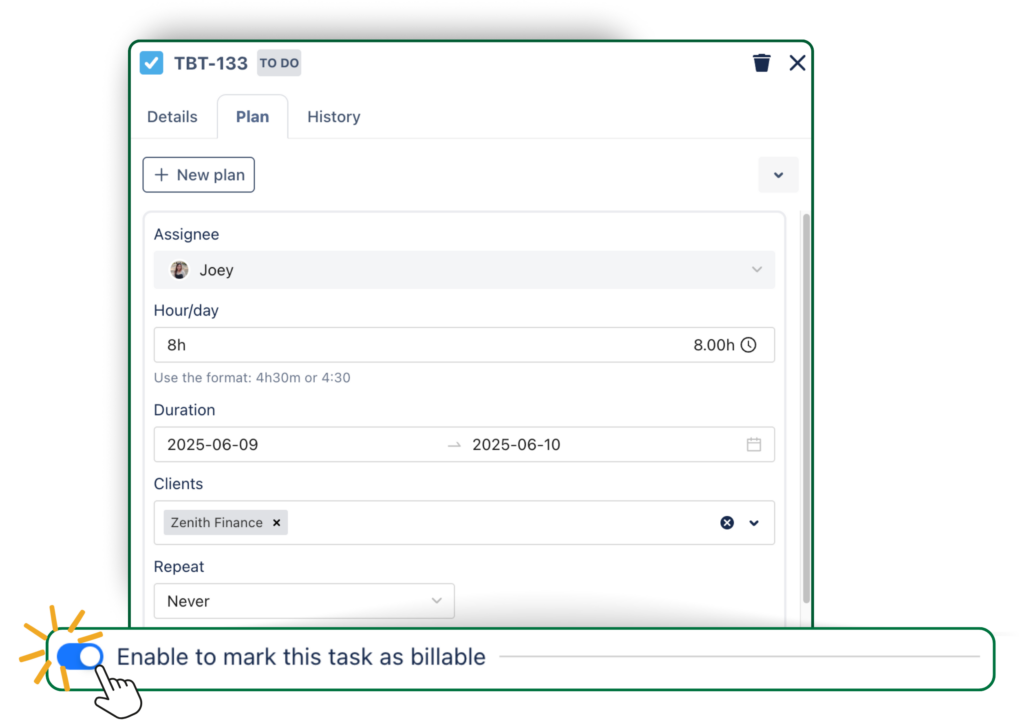
How to track billable hours with TimePlanner
For project managers, the value lies in reducing manual effort and increasing confidence in reports. Instead of assembling data from multiple sources, leaders can rely on consistent, system-generated insights that support actual vs. scheduled cost reporting.
4. Standardize time logging habits across the team
Even the most carefully designed system will fail if time logging habits are inconsistent.
From a management standpoint, the objective is not perfect precision but dependable patterns. Encouraging daily logging helps reduce memory errors, while requiring meaningful descriptions ensures that time entries remain useful beyond raw numbers.
It is also important to explain why time logging matters. When team members understand that time data supports planning, staffing, and realistic timelines—not micromanagement—they are more likely to engage with the process responsibly.
5. Organize Jira projects for billing clarity
Project structure plays a major role in how easily billable hours can be analyzed.
Some teams prefer one project per client, which simplifies reporting and billing but can increase administrative overhead. Others group work by product or service and use components or epics to represent clients, contracts, or phases.
Regardless of the model, the guiding principle should be clarity. A well-structured Jira setup allows project managers to answer basic cost and billing questions without extensive manual filtering or explanation.
6. Review, approve, and lock billable time
Last but not least, billable hour tracking should not be entirely self-service. Review and approval processes help maintain trust in the data.
Many teams should conduct weekly or monthly reviews where managers validate logged time before using it for invoicing or reporting. Therefore, locking past periods helps prevent retroactive changes that can undermine financial accuracy.
These steps protect both the organization and the team by ensuring that billing data reflects reality and is not adjusted under pressure.
How TimePlanner helps track billable hours in Jira
Jira can capture time spent, but it does not connect time tracking with cost planning or financial visibility. This is where TeamBoard TimePlanner extends Jira by linking planned work, billable intent, and actual cost, helping project managers and leaders manage billable hours more deliberately.
- Plan billable work at the task level: Define billable and non-billable tasks upfront in Jira, aligning delivery activities with budget expectations before execution begins.
- Apply flexible billing rates: Assign billing rates by task, role, individual, or project so logged time translates automatically into accurate cost and revenue figures.
- Log time directly within Jira workflows: Capture billable effort in real time or retrospectively without switching tools, improving data completeness and reliability.
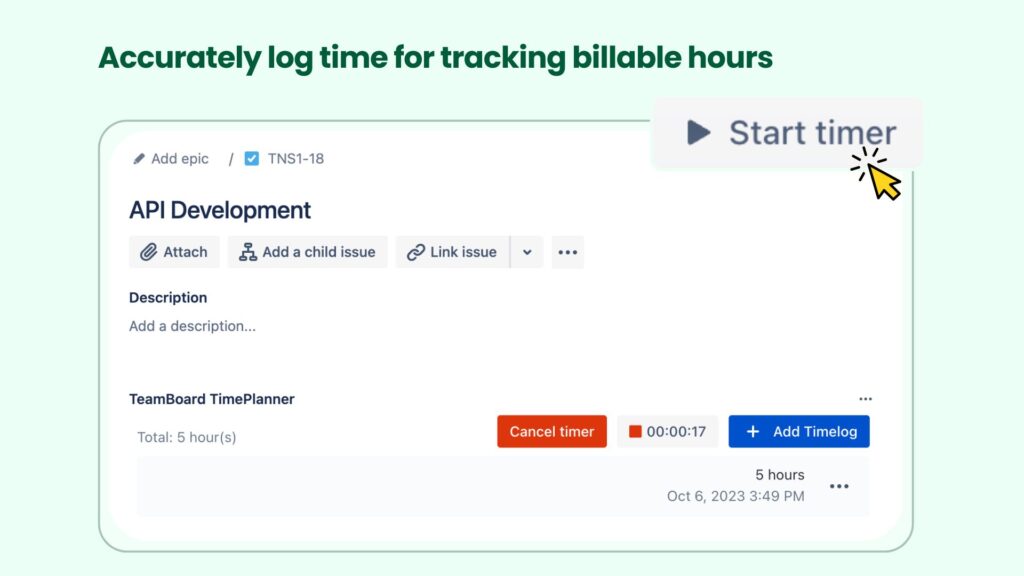
- Track time accurately with task-based timers: Use built-in timers linked to Jira issues to reduce underreported time, especially for teams working across multiple tasks or clients.
- Compare planned vs. actual costs with reports: Review scheduled and actual cost reports to identify variances early and support informed decisions around scope, staffing, and billing.
- Create a shared view for delivery, finance, and leadership: Connect planning, execution, and cost data in Jira to support consistent reporting, governance, and decision-making.
For more details, please check out What are Billable Hours & How to track it using TeamBoard TimePlanner.
Best practices for tracking billable hours effectively
Tools like TimePlanner enable tracking, but leadership discipline determines whether the data is reliable enough to support financial decisions. Remember, strong billable-hour practices are built on consistency, clarity, and trust.
Here are a few tips on how to track billable hours more efficiently.
1. Keep the tracking setup simple and scalable
A common mistake in billable tracking is overengineering the whole thing from the start. Complex configurations may look robust on paper, but often reduce adoption and data accuracy in practice.
Instead, you should prioritize a setup that answers core questions—such as total billable hours, utilization, and cost exposure—without creating unnecessary friction for delivery teams. As reporting needs mature, additional structure can be introduced incrementally. Scalability comes from gradual refinement, not upfront complexity.
2. Clearly document and communicate billing rules
Billing rules should be treated as operating policy, not informal guidance. Clear documentation ensures that delivery, finance, and leadership share the same understanding of what is considered billable and why.
This documentation should include:
- Definitions of billable and non-billable activities
- Examples of common and edge-case scenarios
- Guidance on how to log mixed or partial billable work
Regular reviews of these rules help ensure alignment with evolving service offerings, contract terms, and financial objectives.
3. Encourage consistent and timely time logging
Timeliness directly affects accuracy. When time is logged long after work is completed, estimates replace facts, reducing the reliability of cost data.
Leadership should set expectations around regular logging—ideally daily or shortly after work is performed—and reinforce that consistency matters more than granular precision. Reliable patterns enable better forecasting and reduce downstream reconciliation effort for finance teams.
This is also where TimePlanner’s Stopwatch Timer comes in handy. It enables users to track their work time precisely in real life, then log it to their timesheet for submission and review.
4. Require meaningful worklog descriptions
Time entries without context limit their value for review, billing, and audit purposes. Short but meaningful descriptions help explain how effort was spent and support transparent client communication.
From a governance perspective, clear descriptions also protect the organization by providing an auditable trail of delivery activity. This becomes increasingly important as organizations scale or operate in regulated environments.
5. Review billable data regularly, not only at invoicing
Billable tracking should be reviewed continuously, not just during monthly or quarterly invoicing cycles. Regular reviews allow project managers and finance partners to identify trends early, such as increasing non-billable effort or deviations from planned scope.
As a result, this proactive review cycle shifts billable tracking from a reactive accounting task to an active management practice, enabling earlier course correction.
6. Combine billable tracking with capacity and planning insights
Billable data is most valuable when paired with capacity and planning information. Understanding how much billable work the organization can realistically deliver allows leadership to make informed decisions about staffing, prioritization, and investment.
When billable demand consistently exceeds available capacity, risks to delivery quality and employee well-being increase. Conversely, low utilization may indicate pricing, pipeline, or resourcing challenges that require attention.
Final thoughts
Tracking billable hours in Jira is not just a technical exercise—it’s a leadership responsibility. With clear definitions, consistent habits, and the right level of tooling, Jira can become a reliable source of truth for tracking costs and informed decision-making.
Start simple, build structure where needed, and scale with tools that support both delivery and financial visibility. When done well, billable hour tracking helps teams work more sustainably, projects run more predictably, and businesses grow more confidently.
The post How to Track Billable Hours in Jira Effectively appeared first on TeamBoard – Resource planning, project management and Gantt Chart for Jira, monday.com.
Leave a Reply